
How to Solve No Permission Issue on Local DVR/.NVR
Sherry Tan2022-08-22T05:39:49+00:00DOWLOAD MANUAL PDF
DOWLOAD MANUAL PDF
Reason: No resource means device reaches its maximum decoding capacity, which does not have the resources to decide any more channels. How to check device decoding capacity? You can find device decoding capacity parameter on datasheet. Troubleshooting Methods: 1. Double click the "No Resource channel for 1 window mode preview, if it prompts 'No Resource, probably because your NVR not compatible with such high definition cameras. Please reduce main stream resolution of camera to solve this issue. 2. "No Resource only appears on multiple windows mode, we can check stream type for each window on live View page. Click icon [...]
There're two main ways to unbind device from Hik-Connect account. How to Unbind Device via Hik Connect APP https://youtu.be/2CpCULDMsw How to unbind device via SADP tool https://youtu.be/xzQpDkKubN5 Before unbinding, please make sure: 1. Device password is correct. 2. Device Hik-Connect status is online. 3. Device and mobile/computer connect to the same LAN. Case 1 When you unbind device, it shows "Only the device in the same area with the app can be unbound from its account in Hik-Connect app or SADP tool. Solution: 1. Via app: Use new account with the same registered area information to unbind. 2. Via SADP: [...]
Five Steps to Solve Miscounting Issue of Dual-Lens People Counting Camera
How to Control Analog Speed Dome by Pelco-D/P Protocol Preparation Analog Speed Dome DVR Coaxial Cable RS-485 Cable How to Control Analog Speed Dome by Pelco-D/P Protocol 1. Connect DVR and Analog PTZ Camera 1.1 Power on analog PTZ camera The pigtails of analog speed dome (take speed dome for short in next contents) is shown in Figure 1-1, it includes three kinds of cables: coaxial cable, power cable and 485 cable (for PTZ control). Figure 1-1 pigtail of analog PTZ camera Connect power cable of speed dome and relative power adapter, as shown in [...]
How to Use Search Tool for Important Firmware Update on Hik-ProConnect APP Applicable to Hik-ProConnect 8.4 and above Open Me->Tools->Search for Important Firmware Update Currently, the Hik-ProConnect APP supports two methods search for the device affected by security vulnerabilities. 2.1 Scan QR codes / barcodes on device and labels 2.1.1 Scan QR codes / barcodes on device 2.1.2 Scan QR codes / barcodes on labels 2.1.3 Scan QR codes / barcodes on packing box 2.2 Enter device serial No. manually to search for the device affected by security vulnerabilities. If there is firmware to be upgraded, the device [...]
How to Use Search Tool for Important Firmware Update on Hik-ProConnect Portal Applicable to Hik-ProConnect V1.9 Open Tools->Search for Important Firmware Update 2. Currently, there are two ways to search for the device affected by security vulnerabilities. 2.1 After opening the tool, it will automatically search in the same LAN. After searching, you can see the model, serial number, firmware version, IP, port and other information of the vulnerable device. 2.2 Enter device serial No. manually to search. Download the secure firmware package and upgrade. Batch upgrade devices Click Batch Upgrade Device(s), it will jump to the On-Site Batch Update [...]
2 possibilities
1) there is a possibility that the existing network cable connected to camera switch is unplugged. This one need to trace the cable.
2) change of IP address within the network. Need to reconfigure the IP camera. This one need IT service to reconfigure.
It’s recommended to consult with a security system professional
1) Monitor power OFF & On, make sure HDMI cable is working and plug in correctly
2) Make sure cameras cable plug in correctly to recorder
3) Restart the CCTV system
The amount of storage needed for a Digital Video Recorder (DVR) depends on several factors, including the resolution and quality of the video being recorded, the number of cameras connected to the DVR, the frame rate at which the video is recorded, and the duration for which you want to retain the recorded footage. Here’s a general guideline to help you estimate the storage requirements:
1. Resolution and Quality: Higher resolutions like 1080p or 4K require more storage space than lower resolutions. Higher video quality also requires more storage.
2. Number of Cameras: The more cameras you have connected to the DVR, the more storage space you’ll need to accommodate all the video streams.
3. Frame Rate: The frame rate at which the video is recorded affects storage needs. Higher frame rates result in smoother video but also require more storage.
4. Retention Period: Consider how long you want to retain the recorded footage. The longer you want to keep the footage, the more storage space you’ll need.
5. Compression: Many DVR systems use video compression techniques to reduce the amount of storage needed. Different compression methods have varying levels of effectiveness.
You may download and refer to our matrix here.
It’s important to note that this is a basic estimation, and actual storage needs can vary based on the specific equipment, settings, and usage patterns. It’s recommended to consult with a security system professional to determine the most suitable storage capacity for your specific requirements.
H.264, referred to as Advanced Video Coding (AVC), emerged in 2003 as a video codec. Presently, several video streaming platforms, like YouTube and Netflix, make use of this codec. H.264 was crafted to deliver superior video compression with minimal data usage, making it well-suited for online video streaming.
H.265, recognized as High Efficiency Video Coding (HEVC), made its debut in 2013 as a video codec. It follows in the footsteps of H.264 and aims to offer enhanced video compression without compromising video quality. H.265 can achieve a compression improvement of up to 50% compared to H.264, making it particularly advantageous for high-resolution video formats.
While both possess potent capabilities for generating top-notch results, they exhibit differences. The primary distinction between H.265 and H.264 lies in their compression efficiency. H.265 can attain a compression improvement of up to 50% compared to H.264, implying that it can convey video of identical quality while utilizing less bandwidth or storage space. This characteristic renders H.265 particularly well-suited for demanding video formats like 4K and 8K.
The customer may have the request to save the video record backup.
Note: This function need more than two hard disks and the redundancy must be used in group mode.
Preparation
NVR.
How to configure the group function in NVR:
Steps:
1. Enter Storage interface and select Storage Mode in the drop-down list on the top-left side.
2. Select Group mode in the right.
3. Click the channel which need to be record in redundancy and Apply.
4. Wait for the system rebooting.
1. Enter the Heat Map configuration interface: Configuration > Heat Map Configuration
2. Check the checkbox of Enable Heat Map to enable the function.
3. Click Draw Area to define the area you want to count the visitors. Draw area by left click four end-points in the live view window, and right click to finish the area drawing.
Notes: You can click Select All to select the whole live view window as the configured area. Or click Clear to delete the current drawn area.
4. Set the Max. Size and Min. Size for valid targets by clicking the corresponding button and drawing on live image. Targets smaller or larger than the valid target size are not able to trigger detection.
Max.Size: The maximum size of a valid target. Targets with larger sizes would not trigger detection.
Min.Size: The minimum size of a valid target. Targets with smaller sizes would not trigger detection.
5. Configure the parameters of Heat Map.
Validity: Camera use this value to judge if a target it detects is a valid one or not. Invalid target will not be included in the statistics. The higher you set the value, the harder a target would be treated as a valid one.
Uploading Data Type: There are two options selectable for uploading data type. Dwell Time and Dwell Time and Heat Map of People. The uploading data will only upload Dwell time information if selecting Dwell Time type; if selecting Dwell Time and Heat Map of People, the data it will contain Dwell time and Heat Map of people.
Email Report: The data report can be deliveried by email. The report type includes Daily Report, Weekly Report, Monthly Report and Annual Report.
6. Go to Arming Schedule tab, and click-and-drag the mouse on the time bar to set the arming schedule.
7. Go to Linkage Method tab, and select the linkage method by checking the checkbox of notify the surveillance center.
8. Configure Shield Region if necessary. Shield Region is used to shield the area which doesn’t want to count the heat map statistics. Up to 4 shield regions are configurable.
9. Click Save to save the above settings.
10. The heat map statistics will be calculated in Application tab. Go to Application to check the counting statistics.
Steps:
1) Select the report type. Daily report, monthly report, weekly report, and annual report are selectable.
2) Select the Statistics Type. By Dwell Time and By Heat Map of People are selectable.
3) Set the Statistics Time. If you select the report type as anyone other than daily report, the camera generates reports for the week, calendar month and calendar year that the set date belongs to.
4) Select the chart mode for statistics showing. For heat map, Time Heat Map and Space Heat Map are selectable.
5) Click Counting to start calculating
Notes: When you choose Time Heat Map, you can export the data in a excel file by clicking the Export on top right corner of the interface and setting the saving path.
Camera Installation Requirements
1. The height of the camera needs to be in the range of 2.5 m to 6 m.
2. The tilt angle of the camera is recommended to be in the range of 25° to 60°.
3. The best detection area is within 6 m of the horizontal distance from the camera.
Camera Configuration
1. Select VCA Resource.
It is necessary to select the VCA resource as Behavior Analysis.
2. Camera Calibration Configuration.
1) Enter 【VCA】-【Camera Calibration】and select the calibration mode. Manual Calibration and Auto Calibration are selectable.
Auto Calibration Mode: It will generate the lens height and a green calibration area automatically. The calibration area is used for calibrating the height from the ground to lens. So we strongly recommend to select the totally ground part as calibration area.
Note:
1. The Auto Calibration Mode is recommend.
2. The ground area where the green frame is calibrated should be free of reflections and backlighting. If there is a case of reflective backlighting or less texture, it is recommended to lay a rich texture such as a newspaper for calibration to improve the accuracy of the calibration.
Manual Calibration Mode: Input the Lens height (the height from Entry/Exit area to the camera), Tilt Angle and Heel Angle manually. To increase the success rate of the manual calibration, make sure the lens height is the true value in vertical direction between the lens and the ground.
2) Click “Calibration”. The blue area is for detection. A prompt “Calibrated” will automatically appear in the lower right corner.
Note:
1. If auto calibration fails, please check whether the ground is selected as the calibration area.
2. It is recommended to keep the Mirror off, otherwise it will cause calibration error.
3) After the calibration is finished, you can click “Verify Calibration” to obtain the height of the clicked position by clicking the image on the screen, which can verify the accuracy of the calibration.
3. Rule Configuration.
1) Enter 【VCA】-【Rule】and click the plus sign in the upper right corner of the interface to add a rule. Enable the rule, set the rule name and choose the rule type as Distance Exception.
2) Set “Duration”, “Mode” and “Distance Threshold”. The device can trigger the alarm of the corresponding rule by judging the distance between any two people in the rule area.
Example: You need to receive the alarm in 2s when the distance between the two is less than 1 m. You can set the “Duration” to 2s, the “Distance Threshold” to 1 m and select “Less than” for the “Mode”.
Follow step by step guideline here
1. Connect the camera to the power supply and connect the network cable, insert the 4G card, and wait for the camera light to flash slowly. NVR is updated to support the firmware of solar camera. Ensure that the camera and router are under the same router network segment, and the router is connected to the external network.
2. Open SADP, find NVR and solar camera, and double-click to open it.
3. Open the virtual server settings page (port mapping) of the router
4. In the web end network setting of NVR, record the external port of port 80 in NAT and the following four ports in ISUP service setting
5. Port mapping: map the five ports just recorded to the outside. The blue box is the port just recorded, and the green box is the external port. The ports in the green box can be set at will. After setting, record it.
6. To the camera web page, first check whether the 4G connection is normal.
7. Configure the ISUP protocol on the web side of the camera, the server address is the IP address of NVR, and the port is the external port corresponding to 7660 in the green box. The ID and password of the camera can be configured at will. If there are multiple cameras, the ID should not be the same. Save after configuration.
8. Go to the web page of NVR, add a camera, and select ISUP as the protocol
9. Fill in the device ID and password just set at the camera end
10.Refresh the page and see that the camera status is online, that is, the addition is successful.
Check if the resolution of the device is set as 2560*1440 or above. Due to the lack of decoding capability, the computer with Windows XP system may not be able to deliver the image, and you need to install the iRsDecoder to help decoding. In this situation, please contact local support team to get RsDecoder.
Case3. The Device Cannot Deliver Normal Image After Being Plugged in
the USB 3. 0 Interface in Windows 7 System.
USB 3.0 interface is required for 4K 3840*2160 video output, but the
USB 3.0 interface of Windows 7 system cannot drive USB 3.0 product
(since original Windows 7 system does not have USB 3.0 interface). Iti
may cause Black & White Image, Color Distortion. It is recommended to
set the resolution below 2560*1440 or update the operation system of
the computer.
For Windows:
1. Right-click the Windows icon (bottom left) and select Device Manager.
2. In the Device Manager window, select Universal Serial Bus controllers.
3. Locate the USB port by its type (e. g. 3. 0, 3. 1). If there are no 3. 0 or
above ports, your computer is not USB 3 enabled.
For Mac:
1. Click the Apple icon (top left) and select About This Mac.
2. Within the About This Mac window, click System Report.
(optional) For 0S X 10.9 or below, click More Info**.
3. In the System Information window, click Hardware and select USB.
4. Locate the USB port by its type (e. s. 3. 0, 3. 1). If there are no 3. 0 or
above ports, your computer is not USB 3 enabled.
RAID, an array stores data over multiple HDDs to provide enough redundancy so that data can be recovered if one disk fails. If the video recorder supports RAID, when enable the RAID function, and ensure each HDD capacity is not less than 4 TB.
Two ways are available for creating an array:
one-touch configuration and manual configuration.
It’s better to create RAID via One-touch Configuration, RAID 5 will be created by default.
Quota and Group are the two most commonly used storage modes for NVR/DVR.
This article describes the configuration of DVR/NVR storage mode and application scenarios, which helps you better understand quota mode and group mode.
Each camera can be configured with allocated quota for
the store of recorded files or captured pictures.
Configuration:
1. Go to Configuration Record Storage Mode
2. Set Mode as Quota.
3. Select a camera to set quota in Camera.
4. Enter the storage capacity in Record Capacity, click
Apply.
Application:
1. DVR/DVR default storage mode:
DVR/NVR in quota mode default, the quota capacity is set to
0, which means all cameras will use the total capacity of
HDD for record and picture capture.
2. Allocate fixed storage space to each channel:
For example: The location of channel l is important. User
can allocate 10006 space for channel 1, allocate the space
of other channels to 5006.
Multiple HDDs can be managed in groups. Video from
specified channels can be recorded onto a particular HDD
group through HDD settings.
Configuration:
1. Go to Configuration Record Storage Mode.
2. Select Mode as Group, click apply, device will reboot to
take configuration effect.
3. After restart, go to Configuration Record Storage.
4. Click 2 of desired HDD to set the group.
5. Select a group number for the current HDD.
6. Go to Storage Mode, select a group number.
7. Select IP cameras to record on the HDD group, click
Apply.
Application:
1. Redundant Record:
The Redundant Record option is only available when the HDD
mode is Group.
Note: Redundant HDD needs to be in the same group as the
read/write disk you need to back up.
2. Allocate fixed HDD to each channel:
For example: If users want to 1-4 channels be recorded in
HOD 1, 5-8 channels be recorded in HDD 2.
User could set two groups, set HDD 1 to group 1, choose 1-4
channels to record in group; set HDD 2 to group 2, choose
5-8 channels to record in group 2.
If you have connected the camera to NVR and want to synchronize the camera OSD and channel name on NVR after modifying the camera name, please modify the camera name on NVR.
Notes: Modify the camera name on web page of the camera, the camera channel name on NVR would not be synchronized.
There are three methods to modify camera name on NVR:
Go to Camera-Display-Camera nameto input the camera name
1) Login to web page of NVR
http://192.168.31.236:80
Please input the IP:HTTP Port of Hikvision device into
the browser to visit the web page of the device.
2) Go to Configuration-Image -OSD Settings-Camera Name to set and save.
1) Add the device to iVMS-4200 client
2) Go to Device Management-select Device-Remote Configuration-Basic
Settings-Image-OSD Setting- set Camera Name then save.
The devices’ firmware can be upgraded online, if there is a new
version on platform, you can receive notification and upgrade it.
Now there are four methods to upgrade devices online iVMS-4200, Local GUI, Web page and Hik-Connect.
Note: You need to enable Platform and install a HDD firstly when using GUI, Web and Hik-Connect online upgrade. When you use iVMS-4200, please kindly connect the computer which installed ivms-4200 to public network.
The following guidance is for NVR/DVRs.
1. Add device to iVMS-4200;
2. Check the Firmware upgrade status in Maintenance and Management
Device Management > Device, it will display the latest version;
3. Select the device and click Upgrade;
4.Then device will upgrade latest firmware automatically.
Online upgrade by Hik-Connect
1.Add device to Hik-Connect, and click device settings icon, then enter Device Version
2. Check the firmware info and click Upgrade, the device will upgrade new version automatically.
1.Enable platform in Network > Hik-Connect;
2. After device is online, you can click update button and enter the
Online upgrade interface;
3. Click Test Upgrade to obtain latest version info, then download
firmware file and upgrade your device.
1. Firstly, enable the platform: Configuration > Network> Advanced
Settings> Platform Access;
2. After device is online, go to Configuration> Maintenance > Online
Upgrade, click Check Upgrade to obtain latest version info, then
download firmware file and upgrade your device.
• DVR: HGH series with version 4.30 or above.
•NVR: Q /K series with version 4.30 or above.
This document Introduces how to Connect IP camera, set record schedule, export video on NVR/DVR E-UL.

On live view page, click + button to go to camera adding page
Note: Status is Already Connected which means the camera has been added by other devices. It is not recommended to add the Already Connected cameras. Select the Online Device which is needed to be added, Input camera password and click Add button to finish adding.
1. Go to Configuration page-Record-Schedule, set Continuous or Event type,
draw the schedule area Click apply to save configuration.

2. Click edit button, you can disable All-day function to set specific start time and
end time according to you need

Note: There are two ways to export video
1. Go to Search page to select desired time and channel, after searching the video you can export them to external U disk.

2. Go to Playback page to select desired channel, date and playback position on
the time bar, dick Clip button to set the start time and end time, click save to go to export page you can export them to external U disk.

No resource means device reaches its maximum decoding capacity, which does not have the resources to decide any more channels.
You can find device decoding capacity parameter on datasheet.

Troubleshooting Methods:
1. Double click the “No Resource channel for 1 window mode preview, if it prompts ‘No Resource, probably because your NVR not compatible with such high definition cameras. Please reduce main stream resolution of camera to solve this issue.
2. “No Resource only appears on multiple windows mode, we can check stream type for each window on live View page. Click icon

NVR default preview mechanism is as below.

3. I f problem remains after switching to sub stream preview, please go to device Menu- Configuration – Record- Parameter-Sub Stream to reduce the sub stream resolution for each channel.

Note: I or third party camera, it may prompts “this channel is not Supported” on sub stream configuration page. Please access camera through web browser with ip address, then reduce the sub stream resolution lower than 720p. The Max. Bitrate lower than 1024 kbps
There’re two main ways to unbind device from Hik-Connect account.
How to Unbind Device via Hik Connect APP
How to unbind device via SADP tool
Before unbinding, please make sure:
1. Device password is correct.
2. Device Hik-Connect status is online.
3. Device and mobile/computer connect to the same LAN.
Case 1 When you unbind device, it shows “Only the device in the same area with the app can be unbound from its account in Hik-Connect app or SADP tool.
Solution:
1. Via app: Use new account with the same registered area information to unbind.
2. Via SADP: Make sure device is connecting with the same area information as it was bound.
3. If you don’t know the area information of the bound account, please contact support team help you confirm or assign registered area information.
Case 2 When you unbind device, it shows “Operation Failed 7” or “Network Connection Failed” or “Hik-Connect service is offline”.
Solution:
1. Enable Hik-Connect function in device and make device Hik Connect status is online.
2. If device Hik-Connect status goes online and offline frequently change to a stable network or upgrade firmware then try again.
3. If the problem persists, contact support to confirm connection status.
Case 3 When you unbind device, it shows “Incorrect Device IP Address” in Hik-Connect app or SADP tool.
Solution:
1. Make sure your mobile/computer connect to the same segment as device connect to.
2. Try to upgrade device firmware, make sure device and mabile/computer are connect with the same router.
3. If you are using router, enable UPNP function, or connect device and mobile/computer to a router with higher position in topological map.
Preparation
Analog Speed Dome
DVR
Coaxial Cable
RS-485 Cable
How to Control Analog Speed Dome by Pelco-D/P Protocol
The pigtails of analog speed dome (take speed dome for short in next contents) is shown in Figure 1-1, it includes three kinds of cables: coaxial cable, power cable and 485 cable (for PTZ control).

Figure 1-1 pigtail of analog PTZ camera
Connect power cable of speed dome and relative power adapter, as shown in Figure 1-2.
Note: Red cable is positive cable and black is negative one in the pigtail of speed dome power cable, yellow one represents ground(no need to connect), power cable of speed dome is self-adaptive, so you don’t need to concern the connect order.
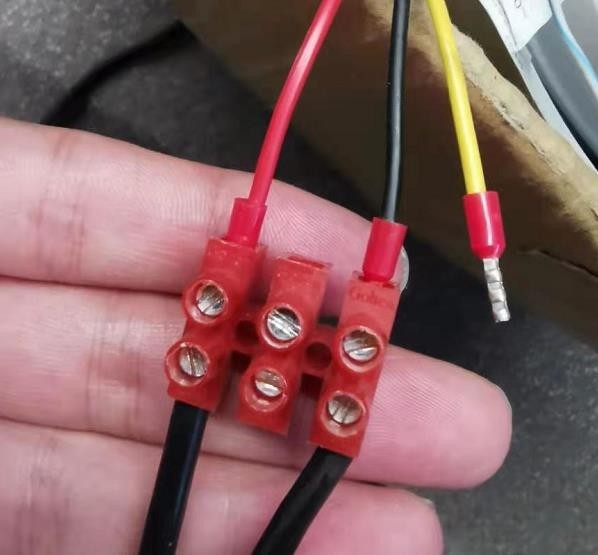
Figure 1-2 Connect PTZ camera power cable and adapter cable
Power on DVR, connect speed dome and DVR analog channel by coaxial cable.
Then you can see live view of speed dome on DVR as shown in Figure 1-3.

Figure 1-3 live view of speed dome on DVR
485 cables are two signal cables in a UTP cable. One should connect 485 pigtail of speed dome and DVR 485 port, take Figure 1-4 as example.


Figure 1-4 Connect DVR 485 port and analog
The main parameter configuration of speed dome is the Baud rate and Address configuration, you can set these on OSD menu of speed dome.
You can call OSD menu of speed dome by Menu bar or 95th preset.
Step-1: Click PTZ Control in DVR live view page, then enter PTZ control page, like Figure 2-1.

Figure 2-1 Click PTZ control in DVR live view page
Step 2: Click OSD menu on PTZ control page.
If you control speed dome using UTC PTZ protocol you can call OSD menu by click Menu bar like illustration in Figure 2-2.

Figure 2-2 Method-1: Call OSD menu by Menu bar (only work under UTC protocol)
If the PTZ protocol is not UTC, you should call 95th preset to call the OSD menu, like the operation in Figure 2-3.


Figure 2-3 Method-2: Call OSD menu by click 95th preset (works for all protocols)
The OSD menu of speed dome is shown in Figure 2-4.

Figure 2-4 OSD menu of speed dome
Enter the SYS SETTING in speed dome by steps illustrated from Figure 2-5 to Figure 2-7.

Figure 2-5 Enter SYS SETTINGS

Figure 2-6 Enter SYS INFO SETTING
Set Address and Baud rate of speed dome in Figure 2-7, also you should enable SOFT ADDR ACT and SOFT BAUD ACT. The soft address is valid address for connecting the speed dome when SOFT ADDR ACT is ON, the selectable soft address rage is from 0/1(Pelco-D/P) to 255. The soft baud rate is the valid baud rate for the speed dome when SOFT BAUD ACT. Is enabled, with 2400, 4800, 9600 and 19200 selectable.

Figure 2-7 Set BAUD Rate and Address parameters
You can configure DVR parameters by both web and local side.
As illustration in Figure 2-8, enter PTZ Parameter Settings on PTZ control page.

Figure 2-8 Select protocol on PTZ control page
In PTZ control menu, set parameters of Baud rate, Data Bit, PTZ Protocol and Address as shown in Figure 2-9 .
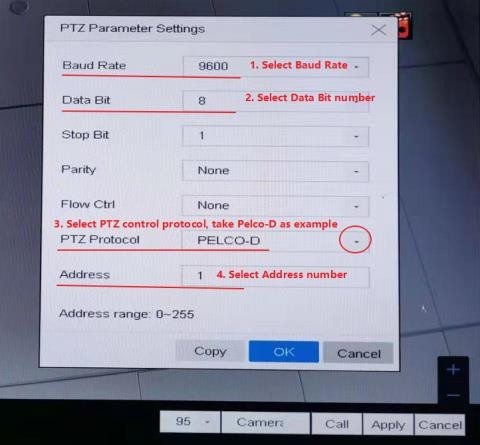

Figure 2-9 Select PTZ protocol(Pelco-D/Pelco-P)
If you want to configure DVR parameters on web page, you should complete the settings in Configuration>System>System Settings>RS-485,(shown in Figure 2-10), all the configurations should be the same as the relative parameters in speed dome.

Figure 2-10 Set parameters on web page
Through configurations above, you can test if the configuration success. Take Figure 3-1 as example, you can see the live view page changed, which means the configuration works.


Figure 3-1 Configuration test

2.1 Scan QR codes / barcodes on device and labels
2.1.1 Scan QR codes / barcodes on device

2.1.2 Scan QR codes / barcodes on labels


2.1.3 Scan QR codes / barcodes on packing box

2.2 Enter device serial No. manually to search for the device affected by security vulnerabilities.


You can upgrade the device firmware through the 4200 tool or on the device’s local web page.

The link after sharing is as follows.


If the firmware of the device is secure and does not need to be upgraded, you will be prompted as follows.


2. Currently, there are two ways to search for the device affected by security vulnerabilities.
2.1 After opening the tool, it will automatically search in the same LAN. After searching, you can see the model, serial number, firmware version, IP, port and other information of the vulnerable device.

2.2 Enter device serial No. manually to search.


Click Batch Upgrade Device(s), it will jump to the On-Site Batch Update page and can be upgraded in batch.

There are two ways to update your devices:
5.1 Upgrade Online
You can select multiple devices for batch online upgrade, or click  to upgrade a single device. (There is no need to download firmware locally)

5.1 Upgrade by Local File
You can check multiple devices of the same model for batch upgrade by local file, or click  to upgrade a single device.

6.1 If there are no devices to be upgraded in the same LAN where the PC is located, No Data will be prompted

6.2 If a device under the network is detected to have the vulnerability, but there is no security upgrade There will be the following prompt.


Hikvision has established one of the most extensive marketing networks in the industry, comprising 59 overseas regional subsidiaries, to ensure quick responses to the needs of customers, users and partners. Hikvision products serve a diverse set of vertical markets covering more than 150 countries.






Connect with us!